Friday, 22 March 2019

Difference between .NET Core and .NET Framework

Difference between .NET Core and .NET Framework 

 1.There are less difference in between .NET Core and .NET Framework. In this short post,      let’s understand difference between .NET Core and .NET Framework.

   Now .NET has two frame work
  1. .NET Framework
  2. .NET Core 
The relationship between .NET Core and .NET Framework is like subset-super set  respectively.

 .NET Core is named “Core” since it contains the core features from the .NET Framework, for both the run-time and framework libraries. 

.NET Core was created so that .NET could be open source, cross platform and be used in more resource-constrained environments.
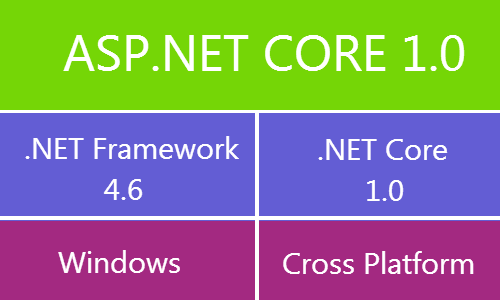

Difference between .NET Framework and .NET Core


So now you can build web application using ASP.NET Core 1.0 and you can target .NET Framework 4.6 and/or .NET Core. The .NET Framework 4.6 runs on top of Windows operating system, where .NET Core 1.0 is a cross platform framework and runs on top of Windows and Non-windows operating systems. 

ASP.NET now also has 2 flavors.
  1. ASP.NET 4.6
  2. ASP.NET Core

ASP.NET 4.6 is upgraded version of ASP.NET  and ASP.NET Core is completely a new platform to build cross platform applications and it was written from scratch.

Please note that .NET Core 1.0 doesn’t have all the features and functionality of .NET Framework 4.6 .

  • I hope you got the basic difference between .NET Framework and .NET Core.

Sunday, 6 January 2019

Export Excel

Export Excel in ASP.Net MVC  using C# With out third party integration

--------------------------------------------------------------------------------------------------------------
Most of the time  we use third party integration to make PDF or EXCEL file to show or download.
Today we will see how we can avoid third party integration and export the excel in c#.

So here we will use StringBuilder class to make a table  and then export that string object as Excel
file.


 When user click on Export excel button It will download the excel file.

Here you can get the code on Onclick action.


Here you can get the code .

Code :

HTML:

<a href="/Area/Controller/TrackExport" class="btn btn-default pull-right"><i class="fa fa-file-excel-o"></i> Export Excel </a>


C# :

        public ActionResult ExortExcel(int? id)
        {
            StringBuilder sb = new StringBuilder();

            string sFileName = "Data.xls";

            //Bind data list from edmx
            var Data = objDBEntity.SP_Name(id).ToList();

            if (Data != null && Data.Any())
            {
                sb.Append("<table border='1' style='4px solid black; font-size:12px;'>");
                sb.Append("<tr style='width:150px;background-color:#fc9003;'>");
                sb.Append("<td align='center'><b>Sr. N o</b></td>");
                sb.Append("<td align='center' ><b>Batch  Name</b></td>");
                sb.Append("<td align='center'><b>Batch  Short Name</b></td>");
                sb.Append("<td align='center' >  <b>District</b></td>");
                sb.Append("<td align='center'><b>Division</b></td>");
                sb.Append("<td align='center' ><b>Training Type</b></td>");
                sb.Append("<td align='center'><b>Institute Name</b></td>");
                sb.Append("<td align='center' '><b>Start Date</b></td>");
                sb.Append("<td align='center'><b>End Date</b></td>");
                sb.Append("<td align='center' ><b>Actual End Date</b></td>");
                sb.Append("<td align='center' ><b>Approximate Completion Date</b></td>");
                sb.Append("</tr>");

                int inc = 0;
                foreach (var result in Data)
                {
                    sb.Append("<tr >");
                    sb.Append("<td align='center'>" + (++inc) + "</td>");
                    sb.Append("<td align='center'>" + result.BATCHNAME + "</td>");
                    sb.Append("<td align='center'>" + result.BATCHSHORTNAME + "</td>");
                    sb.Append("<td align='center'>" + result.DistrictName + "</td>");
                    sb.Append("<td align='center'>" + result.Division_Name + "</td>");
                    sb.Append("<td align='center'>" + result.TrainingType + "</td>");
                    sb.Append("<td align='center'>" + result.InstituteName + "</td>");
                    sb.Append("<td align='center'>" + result.STARTDATE + "</td>");
                    sb.Append("<td align='center'>" + result.ENDDATE + "</td>");
                    sb.Append("<td align='center'>" + result.ACTUALENDDATE + "</td>");
                    sb.Append("<td align='center'>" + result.APPROXCOMPLETIONDATE + "</td>");
                    sb.Append("</tr>");
                }
                sb.Append("</table>");
            }
            HttpContext.Response.AddHeader("content-disposition", "attachment; filename=" +                            sFileName);
            this.Response.ContentType = "application/vnd.ms-excel";
            byte[] buffer = System.Text.Encoding.UTF8.GetBytes(sb.ToString());
            return File(buffer, "application/vnd.ms-excel");

        }


  • If  any one have any question then ask me in comment section.

Custom Pagination

  SQL Server Pagination with MVC and JQuery ----------------------------------------------------------------- The question is, why ...